One thing I’ve learned from my pantry door warning light is that SD cards don’t last forever and it gets pretty old to build a fresh Raspbian install and set up my Blinkt light server (and Tailscale) whenever a card gives out. I kept looking for something that would let me easily build (and update and rebuild) a ready to boot image so that I could just flash a new SD card and be on my way. It took a while but I finally found it with Gokrazy. Thanks to this helpful Gokrazy guide I was able to get an image built with Tailscale preconfigured so that the Pi would join my Tailnet immediately on first boot. Installing my Blinkt light server was just as simple, although I did have to rewrite part of it to use the fantastic periph.io library for GPIO to control the Blinkt strip since the sysfs-based approach I used before wasn’t supported in the Gokrazy kernel. Now the next time I have an SD card failure I’ll just pop a fresh card in the laptop, run gok overwrite and put the card in the Raspberry Pi Zero 2W and be up and ready to monitor the state of the pantry door from the garage in no time.
24 Feb 2024, 21:35
27 Dec 2020, 15:37
We recently moved to a new house, and while there are a lot of things we like about it there’s one small thing that has baffled me. For some reason, the door leading into the house from the garage opens into a short hallway containing a pantry/closet with a door that opens out directly into the path of the door from the garage. As you can imagine this adds an unexpected degree of suspense to the the normally mundane task of getting a box of cereal out of the pantry, never knowing if at any second someone returning through the garage might slam the door into you. After one too many unpleasant surprises I decided to create the Pantry Door Collision Avoidance System (henceforth “PDCAS”) out of a few relatively inexpensive1 pieces of hardware and an only slightly Goldbergian amalgam of software. The goal: place a light next to the garage entrance that will come on when the pantry door is open so that you know to proceed with caution. In the following post I’ll go through how I built the PDCAS.
Hardware
- Zigbee contact sensor - in order to tell if the pantry door is open, we’ll need a sensor. I choose this Ecolink model because it’s cheap and we already had an Echo Show that would act as a hub. As an added bonus it also has a temperature sensor. Not bad for under $15. The downside is that I want to control the light with HomeKit and using the sensor through the Echo Show means I’ll need to use both the Alexa and HomeKit ecosystems2
- Raspberry Pi Zero W - This board will be mounted on the wall near the garage entry door and control a warning light. At $10 with built-in WiFi, these are just fantastic for projects like this.
- Blinkt is a strip of individually addressable LED lights that fits perfectly on a Pi Zero.
Software
- Homebridge - Provides HomeKit integrations for just about any kind of device via plugins. I already have an instance of this running on a Raspberry Pi 3 using HOOBS, which bundles Homebridge with a really polished admin GUI. The goal will be to make the Blinkt on the Pi Zero show up as a light that can be controlled by Alexa which we can do with the following 2 plugins.
- homebridge-better-http-rgb - a plugin for Homebridge that shows up as an RGB light in HomeKit and can be configured to call various HTTP endpoints in response to HomeKit requests for the light. It provides a general purpose way to control pretty much anything with HomeKit, as long as you can provide an HTTP api for it to talk to. In this case, I’ll provide an API on the Pi Zero to control the Blinkt.
- homebridge-alexa - The Echo Show Zigbee hub doesn’t provide any direct access to Zigbee devices outside of the Alexa ecosystem so if we want our Blinkt light in Homebridge to be controlled by an Alexa routine it will to show up as device for Alexa as well. Fortunately, that’s exactly what the homebridge-alexa plugin does. You can expose all or some of your HomeKit devices to be available to Alexa as well. The downside is that it depends on an Alexa skill hosted for free by the developer of the plugin. It’s monitored and supported exceptionally well for a free personal project but like any such project it might not be around indefinitely.3
- homebridge-pi-light-server is a service I wrote that implements the API expected by homebridge-better-http-rgb and controls different Pi light boards, like the Unicorn Hat or Blinkt
Overview
Once complete, the overall flow of the system looks like this:
Alexa Routine
Turn on light, set color red]; B --> D[Raspberry Pi 3
Homebridge
homebridge-alexa
homebridge-better-http-rgb]; D --> E[Raspberry Pi Zero W
homebridge-pi-light-server
blinkt turns on];
Setup
- Install the contact sensor on the door and pair with the Echo Show
- Connect the Blinkt to the Raspberry Pi Zero W
- Install homebridge-pi-light-server on the Pi Zero
- Install homebridge-better-http-rgb and homebridge-alexa - With HOOBS this is as simple as clicking a button
Configure homebridge-better-http-rgb
    {
      "accessory": "HTTP-RGB",
      "name": "Blinkt",
      "service": "Light",
      "switch": {
          "status": "http://blinkt-pi.local:8080/api/switch",
          "powerOn": "http://blinkt-pi.local:8080/api/switch/on",
          "powerOff": "http://blinkt-pi.local:8080/api/switch/off"
      },
      "brightness": {
          "status": "http://blinkt-pi.local:8080/api/brightness",
          "url": "http://blinkt-pi.local:8080/api/brightness/%s"
      },
      "color": {
          "status": "http://blinkt-pi.local:8080/api/color",
          "url": "http://blinkt-pi.local:8080/api/color/%s",
          "brightness": false
      }
    }
Configure homebridge-alexa - The full configuration of the plugin is a little more involved and requires the use of a related Alexa skill. Instructions for getting started can be found here. I only want the Blinkt to show up in Alexa since a lot of my other Homebridge devices are available in Alexa by other means, so once everything else is set up I can add the device to an allow list in the config:
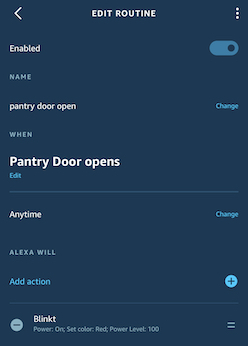
"deviceList": ["Blinkt"]Create Alexa routines to turn the Blinkt on and off.
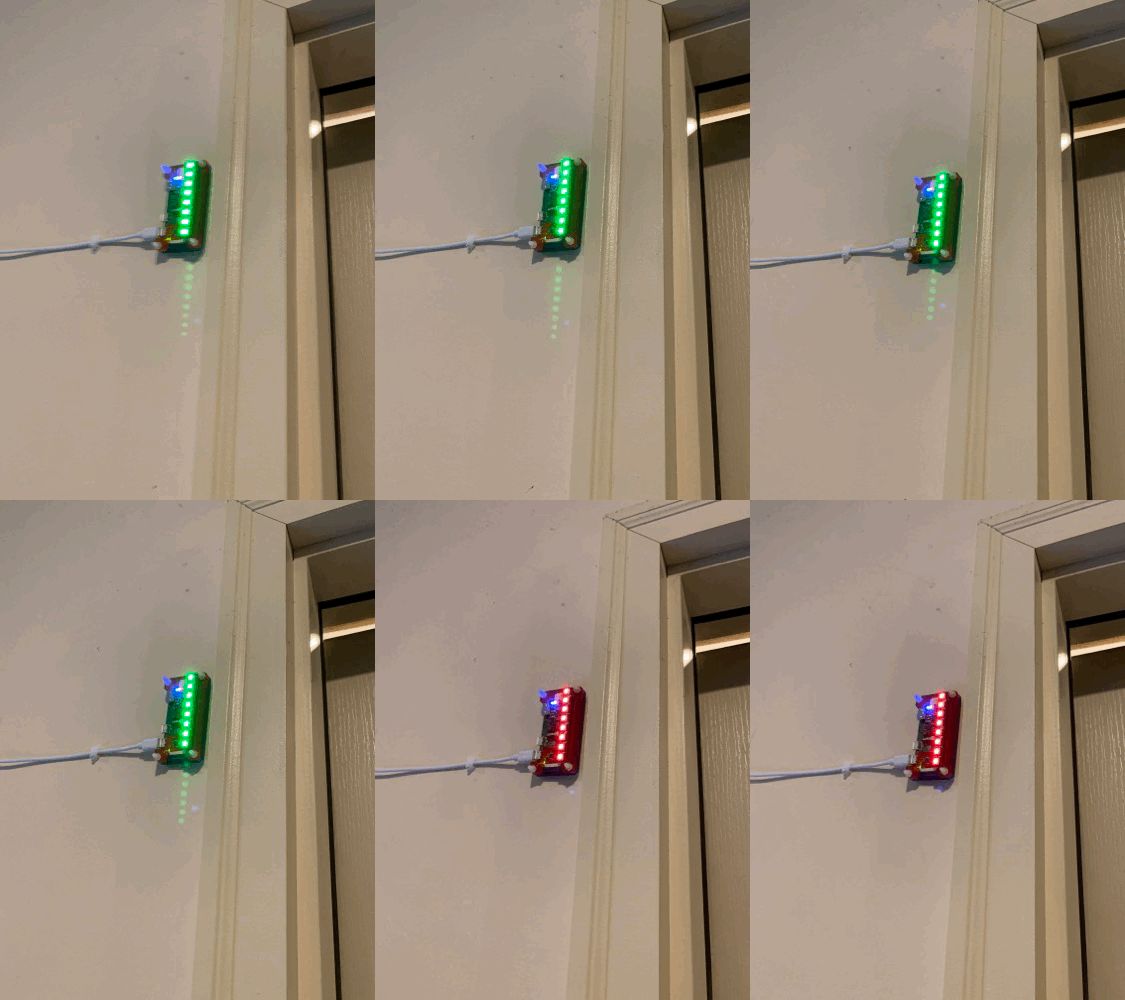
Mount the PDCAS on the wall with some velcro strips and never worry about slamming into the pantry door again.
Footnotes
- Ok, inexpensive assuming you already have an Echo device with an integrated Zigbee hub and a HomeKit hub like an Apple TV. [return]
- Why not make something to run on the Pi and directly expose the light to Alexa? I’ve found that it’s pretty difficult to control local devices with Alexa. Running a skill locally and exposed to the internet is likely possible but deploying skills on AWS Lambda is much easier. However you’d still need to expose something locally for the Lambda skill to talk to the Pi Zero or set up some other communication channel like AWS SQS that both the skill and your Pi can connect to. But now things are getting a little more complicated than I’d hoped. [return]
- What if homebridge-alexa stops working? Well, Alexa routines can also trigger IFTTT actions. An action could call an HTTP endpoint but then we’re back to needing to expose a local service to the internet. An approach I’ve used for other projects is to run the particle-agent on a Raspberry Pi and use the Particle Cloud IFTTT integration to invoke a function through the agent, which can do things like run a script on the Pi. [return]
01 Jun 2019, 14:46
For my 30 day challenge in May I decided to go back to avoiding something rather than adding something. When I spent a month without using my phone at home I thought that was really going to be something hard to give up. Since I found that I could do that fairly easily, I decided to do something more challenging and see if I could go 30 days without playing video games. That’s something that honestly hadn’t even occurred to me to as a challenge until fairly recently. Playing games has been a constant in my life for much longer than smart phones have and it didn’t initially feel like something to consider. One of the goals of these challenges is see the effects of changing things that I wouldn’t otherwise change and so it makes sense to alter a major constant like that. After all, when I stopped using my phone one of the things I noticed was that I played more video games. Now that I’m using my phone less, what things would I find to fill that time if I removed video games as well?
Completeness
I finished this one without any issues. I didn’t even slip-up by thoughtlessly starting a game on my phone while I was waiting on something. I can’t remember any other recent time that I would have gone that long without playing games before. The only time that I can be reasonably confident that I wouldn’t have is when I spent a summer working at the YMCA Camp of the Rockies during college. Other than that it seems unlikely that I would have ever had any extended time where I didn’t play.
Difficulty
I was surprised by how easy this one was. It made me realize that I think I’m at a point where a lot of the time that I play video games is out of habit rather than a strong interest. That’s not to say I don’t enjoy games but they seem to be the activity I go to by default even when there are other things I would enjoy just as much.
Effects
Now that the month is over, I’m fairly pleased with how I feel in a number of ways. I enjoyed reading more and I started learning Rust (which seems like a good source of a future challenge). I also watched more TV, and I feel like no matter what activities I eliminate there will always be a need to spend some time just doing something mindless to relax and that’s ok. If I want to accomplish something more than that, I need to set a goal to do something specific during the 30 days rather than hoping I’ll use newly gained free time to do it.
There’s also a feeling of obligation that comes from owning more games than I’ll ever have time to play. Years of poor impulse control during Steam sales have built up a backlog of games that I feel like I should play since I bought them. In a way, not being able to play any games at all was freeing since I didn’t have to consider this at all.
What’s next?
I’ll definitely be playing video games again soon. There are so many unique and creative things to experience within that form of media that I don’t want to miss. But I think it would be good to be more selective about playing to find those experiences rather than playing because I don’t want to think of something else to do, or because I feel an obligation to finish a game that I bought.
02 May 2019, 21:13
As April comes to an end it’s time to look back at my 30 day challenge for the month: writing for 30 minutes every day. This challenge didn’t leave me with the same kind of immediate positive benefits that the previous one did. I don’t know that I’m coming out of it with any lasting changes to my routine that I plan to make. There’s still a list of things that I’d like to write about but I’m not sure if I will, especially as I move on to other challenges. I have some mixed feelings about this. It’s not as if I expected to start writing daily or even weekly, but I wanted to learn how to lower the effort that it takes to get started writing in the future and I’m not sure that I did. Writing can be unpleasant. It’s not easy to sit down in front of a blank editor and will words into existence. It’s not easy to read and re-read something, trying to figure out if it really sounds the way you want and gets your point across. But there’s something that feels valuable in setting aside time and forcing yourself to do it. Even when it wasn’t really the thing that I would have preferred to do, sometimes I’d get going and not notice the time going by until I was almost done. I’m hoping that I can find a way to get to that state more consistently.
What did I write? I managed to publish a several posts here, as well as make a good start on a number of others. Perhaps the most notable thing is that I finally got started on a technical blog, which had been an on-and-off goal of mine for years. I haven’t gotten it quite ready to publish but I have several posts ready to go when I do. So that’s not nothing.
Consistency
The first thing to get out of the way is that I didn’t manage to get the writing in every day. Schedules are already busy and when extra things come up it’s easy to lose that window of time. Ultimately, I decided that while I could have replaced morning exercise or stayed up later, that wasn’t something I wanted to do for this challenge. At first, when I missed a day I would make it up by writing twice as long the next day. Approaching the end of the month though I missed a couple days in a row and it got harder to stay motivated to make all those up at once. So I ended up about 3 or 4 days short on this one. I’ll take that as a lesson that next time when I try to do something every day I shouldn’t let myself take on debt to make up on other days.
Changes
Did I notice any changes? I had hoped that by writing every day I would notice that it started to get easier and that I would be able to organize my thoughts more quickly and clearly. At best I think I could allow that I saw a hint of this being possible. From time to time I find that I can write in something more fluid but not quite a flow state where I don’t have to stop frequently to consider and reconsider what I want to say. Writing prose remains more challenging and more unsatisfying in many ways than writing code. In this regard, perhaps 30 days is simply too short of a duration to notice a change or perhaps I needed to aim for more than 30 minutes a day.
On types of challenges
One counter-intuitive thing that I noticed during this month is that it’s easier to challenge yourself to not do something that you would normally do than it is to do something that you normally wouldn’t. I assumed that when I went without using my phone at home last month that I would constantly be thinking about it and wanting to use it but that wasn’t the case. Instead, I found lots of other things to do instead. I think that’s the key point. When you choose not to do something, you have any number of other activities that can take its place. By choosing something that you must do, you have to set aside all of the other activities that you could be doing with that time. It’s much harder to do one particular thing no matter what else you want to do than it is to be able to choose a replacement to something that you might have done.
18 Apr 2019, 21:36
I live by iCloud reminders. On any given day I’ll probably create at least 5 reminders, both for things I need to do that day as well as further out in the future. Out of all the different task/reminder systems I’ve tried, iCloud reminders seem to be the most effective in getting me to actually complete things. Many tools send you a single notification when something is due and if you brush that off because you can’t do it as soon as that notification arrives then you won’t be reminded again. Reminders on the iOS lock screen are “sticky” and you’ll keep seeing them until you take some action. Being able to create new reminders effortlessly without interrupting my work is important to me. For years, I used an Alfred 3 workflow for creating reminders. It works well but requires me to remember a specific syntax. Even after using it for that long I would often need to look up how to do something that was different from my most common usages.
When Siri came to macOS, my first thought was that I would never end up using it. When am I ever going to talk to my Mac? Certainly not at work and not likely at home either. I promptly forgot all about it until not too long ago when it dawned on me that I had seen something about using text to control Siri being added to macOS and that might give me a new way to manage reminders.
The feature isn’t enabled by default so the first thing to do is set that up. In System Preferences, search for “Type to Siri” and select it
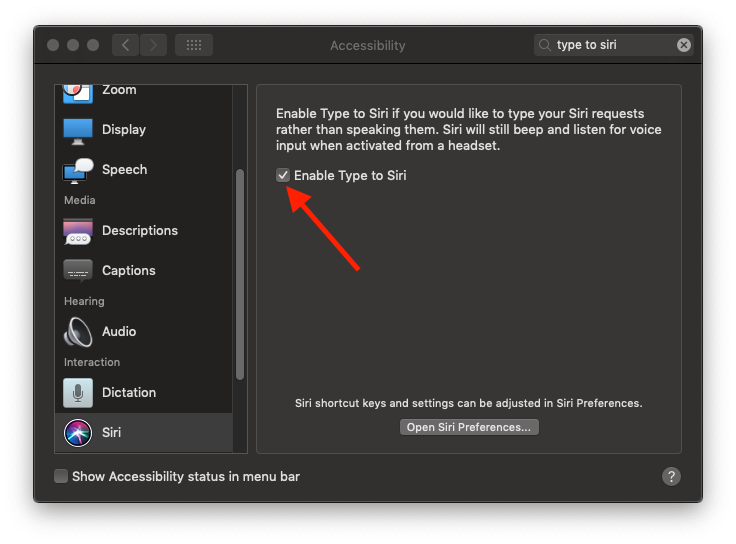
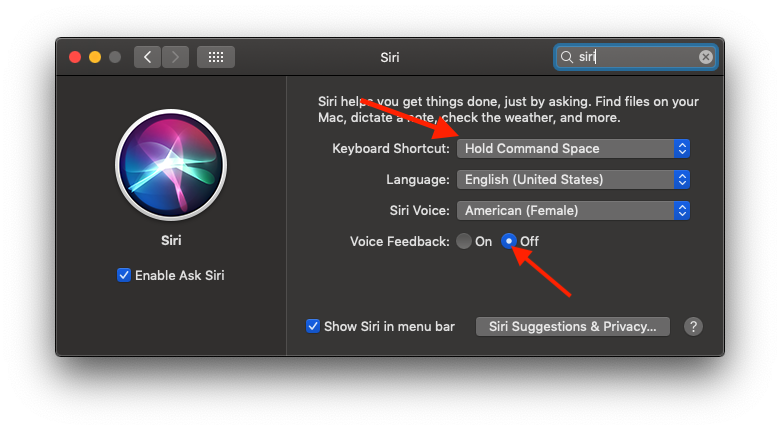
There’s already a default keyboard shortcut for launching Siri, which is to hold down Command (for a second or so) and then press Space. If you want to change that, it’s under the Siri section in preferences. This is where you can also turn voice feedback off if you want. That’s what I’ve done since I never use voice commands and I can always read the feedback on screen.

It’s quite a bit more flexible and forgiving of natural language than the Alfred workflow is. You can create recurring reminders:
Remind me to take the trash out every Monday at 7am
Or even location aware:
Remind me to water the plants when I get home.
As nice as that is, there’s still one thing that the Alfred workflow does better. Whenever certain applications that it supports are active, it can create a reminder with a link to the URL or file open in that application. For example, if I want to remember something about a page I have open in Chrome I can run the workflow with r this in 30 minutes and it creates a reminder that includes the URL. This kind of context-awareness is something I’d like to see more of in Siri (and apps in general really).
15 Apr 2019, 22:38
After seeing glowing praise from Jessie Frazelle and Brian Cantrell for The Soul of a New Machine I decided that I had to give it a look. (And then I promptly got hooked by Amazon’s “buy this too” recommendations and grabbed Where Wizards Stay Up Late and Hackers for good measure. I guess I’m on something of a history of computing bender) These books were a great way to spend some of the extra time I found myself with during last month’s challenge.
TSoaNM is definitely worth reading. It’s the rare kind of technical journalism that not only captures the experience of what it’s like to create systems but also really gets into the details of the challenges and explains them in a way that doesn’t over-simplify them but doesn’t sacrifice clarity either. What I think surprised me the most was just how relatable the engineers and their environment were, despite the 40 year time difference and the fact that I’ve never worked with hardware. So many of engineering tropes that I’m familiar with were recognizable. There’s a part near the end where two engineers finally solve an elusive bug and just as they’re declaring victory, they sse that a different test has started failing. One of the most dreaded feelings an engineer can experience, captured perfectly. Or perhaps the most relatable part was the feeling many of the engineers had of not being able to set down a particular problem once it had hooked them, but having to dive in and obsess over it until it could be understood. Despite all the differences in technology, some things just never change.
The cast of characters is interesting too, composed of archetypes that feel familiar. I think it’s interesting to see which one you identify with the most. For me there’s no question that it’s Ed Rasala:
“And I may not be the smartest designer in the world, a CPU giant, but I’m dumb enough to stick with it to the end.”
Rasala was far from dumb though. He was just somewhat puzzled and, at the same time, bent on self-improvement”
“I’m an implementer. I’m not going to go out and invent anything. But making it work is fun.”
“Somewhat puzzled and bent on self-improvement” wouldn’t be a half-bad description of how I see myself. Not the smartest, not the dumbest, but just intent on learning and determined to see things through and make them work.
It’s interesting too that this this story with all of the drama and long hours doesn’t exactly wrap up with an ending fit for a movie. The Eagle doesn’t end up igniting the world and going on to be a landmark in computing history. The team receives accolades and moves on, drifting apart into other projects or other companies. Despite the limited lasting impact, no one seems to regret the effort that they put in. They shipped something they were happy with, and often that’s enough. Being deeply engaged in the creative process is intensely rewarding on its own, and getting to finish the project and get it out into the world is even better.
One of my best work experiences had similar elements. It was demanding and difficult but I was working with great people in a creative environment building something big and new. We were given a great deal of latitude to solve problems ourselves and work independently. Meetings were largely unnecessary as informal conversations and debugging sessions provided a constant source of communication and feedback. Entire weeks went by working completely on a maker’s schedule. And it was great when we finally shipped, but also kind of a let down. Projects like that are hard to move on from. Even when you’re working with many of the same people, the energy just isn’t the same.
On a final note, I found it interesting that even that early on in computing there were concerns about the possibilities for undesirable outcomes in the application of technology. Upon surveying the myriad of computer vendors at the National Computer Conference, the author wonders about the implications of a digitized society on privacy, employment, and warfare among other things. From where stand today it’s clear that many of those concerns were well-founded. Norbert Wiener’s fear that development would fall “into the hands of the most irresponsible and venal of our engineers” seems sadly accurate in light of today’s business models that value “engagement’ over quality, privacy, and security. And yet, despite these possible ends we can’t help but design and create systems
…it seemed to me that computers have been used in ways which are salutary, in ways that are dangerous, banal, and cruel and it ways that seem harmless if a little silly. But what fun making them can be!
11 Apr 2019, 21:38
I actually have no idea. Given that I did it, this might seem odd but there it is. Well, I suppose I can’t say I have no idea. Tracking calories, eating less, and exercising were certainly helpful. But I’ve tried each of those things to some degree in the past. How is that this time I’ve managed to keep going long enough (8 months so far), unlike prior attempts that burned out quickly? Sadly, that’s where I can’t make any grand pronouncements that will work for everyone (and if I could, I’d probably be rich). What I can do is try to hazard a few guesses about what worked for me.
Be haunted by the spectre of your inevitable demise
I turned 40 last year. After spending the better part of the last 15 years 20-30 pounds above an “overweight” BMI, I finally had to come to grips with the fact that time wasn’t on my side. I knew that it wasn’t going to get any easier from here on out and I really wanted to see if I could get things under control before my 40th birthday. This is likely one of the factors that helped me see it through. However, there’s another reason that my age may have helped. Over the years I’ve noticed that my perception of the passage of time has quickened. Working on something that takes months would have seemed an eternity in my 20’s but now seems like a manageable amount of time. Instead of giving up with a barely noticeable shift in weight after a few weeks, now I find myself noticing as the months drift by and the losses accumulate.
Jump in the deep end
Last August my wife and I decided to try the Whole 30 diet. The gist of this is that you cut out lots of kinds of foods (grains, legumes, sugar, dairy, alcohol, etc) entirely for 30 days to see how you feel and then gradually reintroduce them to see which ones have a negative effect on you. (I suppose this was actually my first 30 day challenge, although I wasn’t aware of the concept then) I went into this with a healthy dose of skepticism; any diet with a ™, ©, or ® seems likely to be driven more by marketing than science. The idea that a few categories of foods could be responsible for such a wide range of maladies rings of the dreaded “toxins” so often decried by pseudo-scientific nonsense. In this case though, the idea of eliminating and reintroducing had just enough of an experimental feel that I figured “why not?” and if nothing else cutting out that many sources of calories would certainly jump start my progress.
It certainly did that. I lost 10 pounds in August and we hadn’t even started at the beginning of the month. The experience was generally much less grueling than I thought it would be, although I did come out of it not wanting to eat any more almonds for quite a while as those were one of the few reliable go-to snack options. As for the other supposed health benefits? Well, not so much with one notable exception. Eliminating added sugar produced a noticeable change in how I felt. Specifically, I think that contributed to “smoothing out” the rate at which I would get hungry and made it easier to avoid eating between meals. It’s also lead to a lasting change in the way I eat. I’ve long since reintroduced sugar but I’m eating only a fraction of what I would before. It wasn’t uncommon in the past for me to succumb to a late afternoon craving and make a vending machine run for candy but I’ve been avoiding that entirely. I also haven’t had any kind of soda (artificially sweetened or not) since then and I don’t intend to start again.
Track all the details
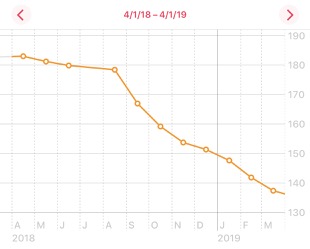
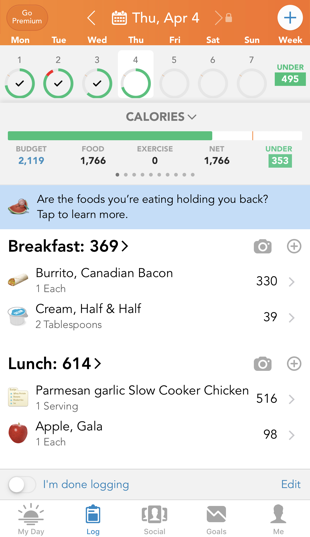
I’ve never needed much of an excuse to record and chart data about the most trivial things, so getting into gathering all kinds of data about my progress was only natural. I tracked my calorie consumption using the LoseIt app, calories burned via Apple Watch and weight + body fat percentage via a Bluetooth scale and Apple Health.
Calorie tracking has gotten convenient enough that I’ve made it a part of my regular routine without much hassle. (I’m currently on a 237 day streak). I don’t measure or weigh everything I eat so I’m sure there’s quite a bit of inaccuracy but I have to hope there’s enough over and under counting that it balances out. I think I’ve gotten a lot better at estimating quantities of measure and even guessing calories for things without looking them up. This is both good and bad, as it can help keep me on track in situations where it’s not convenient to get out my phone but on the other hand now I automatically think about a guess even when I’m just having something I want to enjoy as a treat.
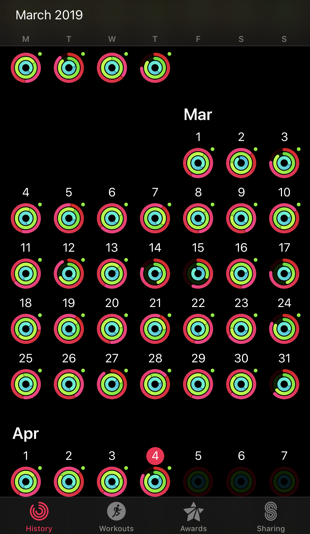
I had used various models of Fitbits for years before this, but they never motivated me to change my behavior the way that the Apple Watch did. It’s hard to say exactly why but the reminders and challenges on the Apple Watch just feel more compelling. Filling the activity rings is really satisfying for some reason, and focusing on calories expended (Apple’s primary metric) rather than steps taken (Fitbit’s primary metric) feels like a more logical approach.
With a reasonably accurate picture of my net calorie loss/surplus and daily weight updates, I’m able to set up a kind of feedback loop and regulate myself. I don’t feel bad if I have a few days where I go over my calorie goal for a special occasion because I can see that those are not the norm and I can see that the trend of my weight is going in the right direction.
Exercise and then exercise some more
Physical activity has never been my favorite thing to do. After a few months of weight loss, my rate started to slow and I knew that to keep making progress without dropping my calorie goals to something unrealistic that I would have to start getting more active. I started by taking a walk after lunch every day, and then ellipticals at the gym and then to jogging on a treadmill. For me, the treadmill feels the most effective. With an elliptical it’s easy to slow the pace without noticing, especially if I’m watching something while I do it. On a treadmill, the pace won’t slow unless I make an effort to adjust it and that keeps me going. I run a 5-4-3-2-1 fartlek (yes really. stop laughing.) program now and I’ve seen a huge improvement from when I started and could barely run for 2 minutes at a time. Another nice data point from my watch has been tracking the change that this has made in lowering my resting heart rate.
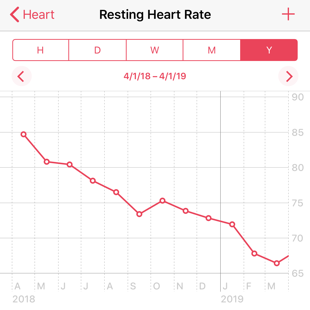 That’s the kind of progress that would otherwise be really hard to see and it has kept me encouraged at times when it feels like my fitness hasn’t been increasing noticeably.
Another app that I’ve found helpful for getting into a good exercise routine is Streaks Workout. It creates a random “playlist” of short exercises that you can do anywhere without out equipment. The first thing you see in the app is a calendar view that shows how long your streak has been going on, which can help give me that extra motivation to keep going on the days that I don’t feel like it.
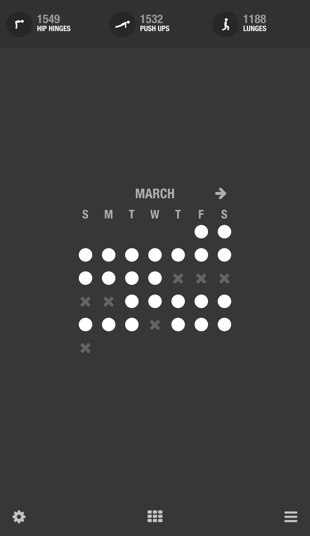
To wrap up, I know all of these things helped me make it to my goal. I just can’t quite explain how they worked this time when I abandoned similar approaches in the past. In the end, perhaps it was a series of seemingly minor differences that added up. By starting with a 30 day window around a diet change, it was easier to get through the hard part because I knew it was temporary. When I got to the end, my mindset had been shifted enough that it was easier to keep from reverting completely to my prior habits. With improved food databases, faster phones and better UI calorie tracking was just enough less inconvenient to be able to become part of my routine. And finally with the Apple Watch’s better user experience around reminders and more types of metrics for tracking progress, I was motivated enough to power through the early morning wake-ups in the dead of winter to go exercise. Or maybe I’d just reached a point in my life where I was ready for it. No matter what the actual cause was I’m glad that I was able to get to this point.
07 Apr 2019, 20:21
Half the fun of having a blog is nerding out over how the blog is built. When I started 18 years ago (that can’t be right) I used MoveableType, which generated static pages for publishing. It worked well enough, but I wanted a Real Website™ with a database and everything so I switched to WordPress some years later. Having better options for comments and more dynamic content was nice enough but really for a personal blog it was unnecessary. Keeping WordPress up to date and blocking spam comments just wasn’t worth the effort. After looking around at some of the static site generators that are frequently used in the JAM Stack, I settled on Hugo. This WordPress plugin for exporting to a Hugo site got the job done for me, with just a minimum amount of additional processing needed.
My first thought was just to start publishing using GitHub pages because it’s a free and well known choice for developers, but then I heard about Netlify from Julia Evans and thought it would be worth a try. The experience with Netlify has been great so far. Really though, the main reason that I wanted to write about this is that I think they are a great example of how there can be a surprising amount of opportunity and untapped potential for improving in product areas that seem to have a number of obvious “good enough” solutions. Static site hosting is certainly something that I would have previously considered to a solved problem. As a developer, it’s already pretty low friction to throw a generated site up on S3 or use the aforementioned GitHub pages. What else can you really do with static sites? A lot, it turns out.
- A Deploy to Netlify button can create a GitHub repo and deploy a template of a new site that will be live in seconds. Even when there are plenty of other options, something super simple that just works is compelling.
- Let’s Encrypt certificates that are automatically provisioned so every site can use SSL without any effort.
- Preview urls generated from branches in your repo to actually see how it will look, not just how it looks when you build locally.
- Support for running a build command so that you can use the static site generator of your choice. GitHub Pages are great but if you don’t want to use Jekyll then you have to manage generating your site and committing the output to the repo before pushing.
- After covering the basics quite well, they also have more advanced features to add capabilities that can be nice to have with static sites, like functions where they can set up AWS Lambda functions on your behalf just from JavaScript or Go files in your repo.
It’s good to be reminded that even with technologies that might seem to have no room for new ideas, focusing on providing a high-quality user experience can still yield substantial improvements.
05 Apr 2019, 21:32
For my April challenge I’m going to be doing 30 minutes of writing every day. I’ve got quite a few topics that I want to write about here and I’m hoping to start a dev blog as well to write about software. The goal definitely isn’t to publish something every day. I’m not sure how many things I’ll actually end up publishing but I’ll at least make progress every day. Right now I feel like it takes me much longer than I would like to be able to organize my thoughts and put something together. One of the things that I’m hoping I’ll get out of forcing myself to practice is that this will get easier and eventually require much less effort to be able to end up with something that I’m satisfied with. Of course, adjusting the expectations for what I consider to be “good enough” may also be part of that process too.
30 Mar 2019, 19:34
I’ve finished the first of my 30 day challenges, so here’s the summary of how it went. For this challenge I decided to avoid using my phone while I was at home. I wanted to do this because I found myself using my phone to fill time at home that I really would have been better off doing something else with. Using my phone was a way to avoid doing not just things that I needed to do but also things that I wanted to do but that were more effort than just swiping through things on my phone. It also gave me an excuse to be less present and aware of time with my family. So how’d it go?
Logistics
Whenever I would come home, one of the first things I would do would be to go plug my phone in and leave it on the nightstand. I found this made it easier to keep from thinking about it or from accidentally slipping into habits. For a while if I left my phone in my pocket I would find myself reflexively pulling it out as I went through my routine only to catch myself and put it back right away. After a couple weeks of leaving it on the nightstand I was able to start carrying it around again without having this problem.
Completeness
I think that I did a good job sticking to the spirit of the challenge and the goals that I had for it, but I did learn just how hard it is to completely disengage from that device. I hadn’t really considered that since I use Google Authenticator for 2 factor auth there were going to be cases where I really had to use my phone to log in to something. I also didn’t want to give up tracking my weight with a bluetooth scale that relied on an app on my phone. So there were still some limited cases where I allowed myself some brief usage. However, I completely avoided using Twitter, checking mail, reading news, etc on my phone.
Time
One of the things that I immediately noticed was how quickly I started doing things that I’d been thinking about using other challenges to motivate myself to do. I read more (physical books no less!), worked on personal projects, and got more done around the house. Those just felt like the natural things to do when I didn’t have the easy default option for passing the time that I’d come to rely on. Sure, I also watched more shows and spent more time on my computer but for the most part I think the time that I got back was well used.
Sleep
I hadn’t thought about this part of it at all, but I was able to get more sleep this month than I normally would have. Previously when I would look at my phone in bed I would often intend to do for just a few minutes but that could easily turn into 20 or 30. So despite having fairly consistent times to get to bed, the actual amount of sleep I had been getting varied greatly. Without that extra time and distraction I found that I slept longer and better.
Presence
I hate to admit it, but I had been doing a pretty bad job about using the phone during times that I should have been present and paying attention to my family. During our bedtime routine with the kids I would often let myself get absorbed in the phone as I waited for them to brush their teeth or get pajamas on. Without the phone these times I was able to use these times to connect and I could tell that it made a difference. This is definitely one of the areas where I think this was the most beneficial.
Conclusion
This challenge was much easier than I’d anticipated it would be, and the results were quite positive. True, there were definitely some inconveniences. My calorie tracking got less accurate and I often had to set reminders for myself to do something when I could get to my computer instead of doing it right away on the phone. So will I keep doing this now that the challenge is over? I think that I’m going to make a permanent change to avoid doing anything that takes more than a minute or so when there are people around that I need to focus on instead. During the rare times that I find myself at home alone, I think I’ll probably go back to doing reading or other tasks on my phone. To sum up, I’m pleasantly surprised with the effectiveness of this first challenge and I’m looking forward to more.